At this point, the project rested for a few months; other things piqued my interests, and I had to focus on other areas of life. However, a few months later, around Christmas 2023, I had some time to pick it up again. I found an old picture frame in a charity shop, which I cannibalised for its matte black backing and glass pane, and made a new, more sturdy cardboard-and-sellotape structure.

This wasn’t a huge change to the actually process or results of the OCR, but it certainly looked a lot better, and gave everything a slightly greater sense of legitimacy.
At this point, I also decided to scrap all of my old prototype code. It was awfully structured and awfully written, and the project deserved better. I come from a background of generally well-structured PHP projects, so the general looseness and brevity of python was pretty new to me, and resulted in some really munged code patterns that I wasn’t happy with.
In rewriting the OCR code, I did some more detailed research on image preprocessing steps to improve the outcome of the OCR. After fiddling, tweaking, and experimenting with a number of different levers, I came out with the following general strategy
- Read the image with OpenCV
- Convert it to greyscale to crush the domain of the pixels, for ease of processing
- Throw the now black-and-white image at Tesseract
- Inspect what we’re left with, and tidy up the text.
At this stage, applying a threshold to the image or trying to edge-find the text actually made the results worse.
Lets look at an example. Here is an image of a card, Clock of Omens, printed in the set Core 2013, released in 2012. The cardboard structure is propped up on a couple of card storage boxes in this image, because I hadn’t introduced an autofocus cycle to the camera yet, so it was using a fixed focal point. The lighting is also clearly uneven, even with the dedicated light, and a second card can be seen poking out the bottom.
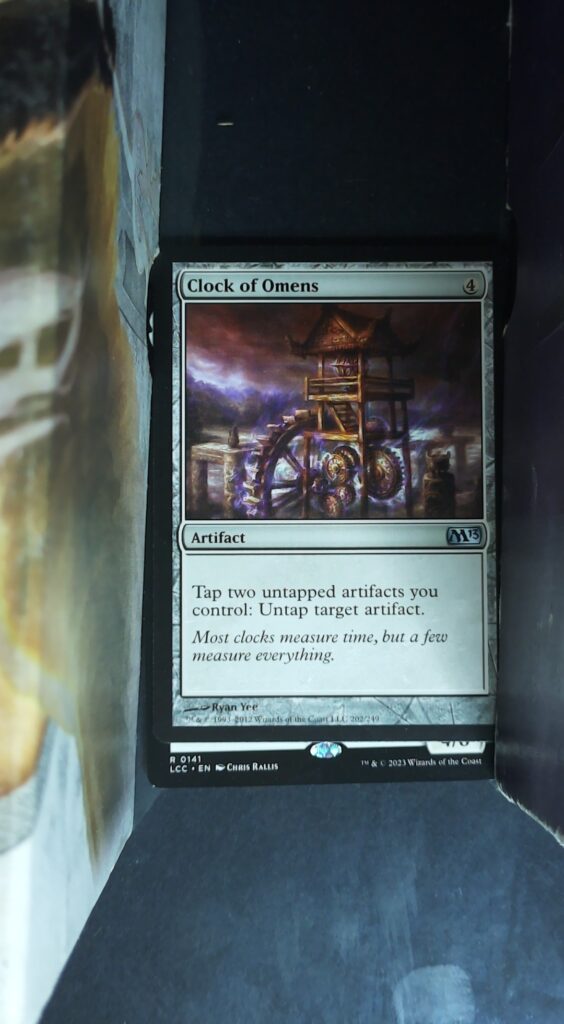
This image was then converted to greyscale, and blurred. While OpenCV is perfectly capable of reading the image as greyscale at the first step, I wanted to be able to separate the logical steps of the preprocessing in order to better understand and debug the process.
import cv2
path = 'input/card.png'
img = cv2.imread(path)
img = cv2.cvtColor(img, cv2.COLOR_BGR2GRAY)
img = cv2.GaussianBlur(img,(3,3),0)
The resultant greyscale blurred image was then fed into Tesseract, which was able to identify some text
import pytesseract
card_data = pytesseract.image_to_data(
    img,
    output_type=pytesseract.Output.DICT
)
card_text = card_data['text']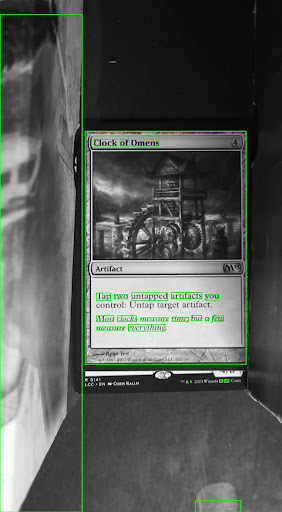
After some programmatic cleanup, primarily the removal of extra whitespace, the recovered text was as follows.
Clock of Omens
Tap two untapped artifacts you
control: Untap target arufact.
Most clocks measure time, but a few
measure everything
1 & © 2023 Wizards of the Coast
\
>
This isn’t too bad! It managed to get the card name, the rules text, the flavour text, and some copyright information from the bottom of the card. Unfortunately, that copyright information is from the card underneath (as mentioned, M13 Clock of Omens was printed in 2012, not 2023), and there are some typos and extra characters. It’s also managed to find some characters in the art on the supporting card storage box. But this is definitely promising.